How to Deal with Mastercam Cannot Output G02/G03 Arc Machining Path?

how to deal with mastercam cannot output g02 g03 arc machining path

Contents

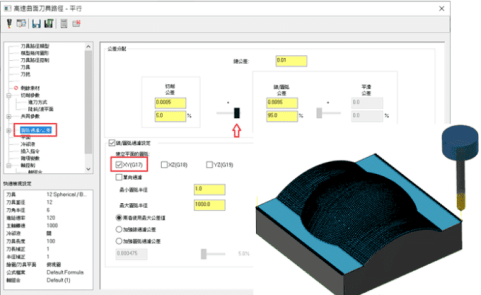
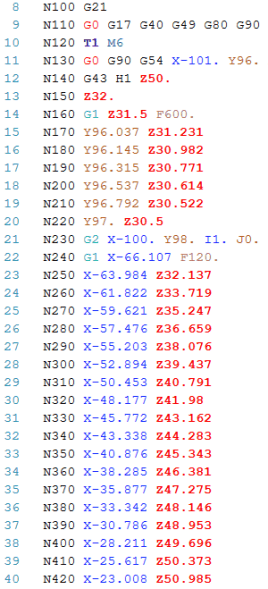
When using parallel processing, the 3d tool path in the circular filter/tolerance option, there are checked using the line/arc filter Settings option function, and pull line/arc tolerance increases to 95% of the filter, but when the linear output analog output and processing program without G02 / G03 arc machining path, output at G01 run way processing program. Why?
The output NC code of this processing path is shown as follows:
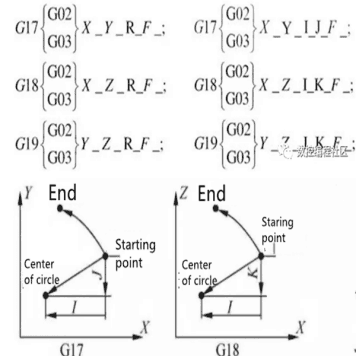
Using the judgment of G02 and G03, the following diagram can be used to understand the axial direction and how to select for output application when using arc interpolation. Usually, in G2 and G3 modes, the system takes two axes as the calculation and output of the tool path. The output format is slightly different except for tool paths such as lower spiral cutters, thread milling, or oil grooves.
Therefore, why the tool path cannot output the arc machining path of G02 and G03? The setting method for solving this problem is to change the option mode of XY(G17) to the option mode of XZ(G18). If you program the tool path to the machining axis to change, you must also switch to another plane mode.
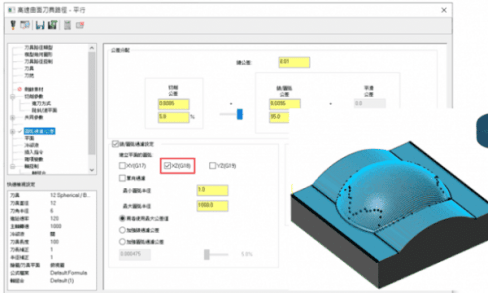
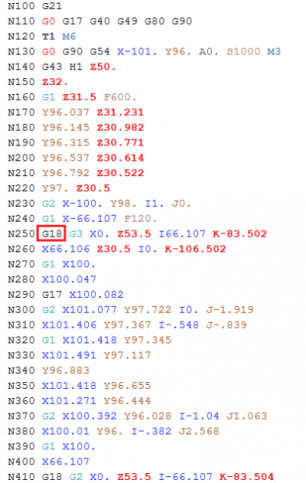
From the linear simulation shown in the figure above, it can be seen that the axial arc filter with XZ(G18) is checked, and a lot of points are reduced. The output NC code of this processing path is shown as follows:

gavinyyi
CEO & Project Manager
Shenzhen Yijin Hardware Co., Ltd.

Gavin Yi

Gavin Yi is a distinguished leader in precision manufacturing and CNC technology. As a regular contributor to Modern Machine Shop and American Machinist magazines, he shares expertise on advanced machining processes and Industry 4.0 integration. His research on process optimization has been published in the Journal of Manufacturing Science and Engineering and International Journal of Machine Tools and Manufacture.

Gavin serves on the National Tooling & Machining Association (NTMA) board and frequently presents at the International Manufacturing Technology Show (IMTS). He holds certifications from leading CNC training institutions including Goodwin University’s Advanced Manufacturing program. Under his leadership, Shenzhen Yijin Hardware collaborates with DMG Mori and Haas Automation to drive innovation in precision manufacturing.

gavinyyi

yijin hardware logo w

Get a quote from the China’s #1
CNC Machining Services.

Ready to get started?
Connect with us today!

Categories
  • Case Studies
  • CNC Machining
  • Custom Fasteners
  • Materials
  • News & Blog
  • Sheet Metal
  • Sports
  • Surface Finish

More To Explore

sheet metal parts accelerating computing power precision sheet metal nvidia
Case Studies
Accelerating Computing Power

How can we achieve a 15% improvement in heat dissipation efficiency and a 30% reduction in production cycle through the synergistic optimization of materials science,

Start today. Get parts made fast.

Free Machined Parts Design to Your Projects with Fast Turnaround Times.
en_USEN

Please attach your 2D CAD drawings and 3D CAD models in any format including STEP, IGES, DWG, PDF, STL, etc. If you have multiple files, compress them into a ZIP or RAR. Alternatively, send your RFQ by email to [email protected].

Click or drag files to this area to upload.You can upload up to 15 files.
Checkboxes

Please attach your 2D CAD drawings and 3D CAD models in any format including STEP, IGES, DWG, PDF, STL, etc. If you have multiple files, compress them into a ZIP or RAR. Alternatively, send your RFQ by email to [email protected].

3D Drawing Formats: .step/.stp, .dwg, .m3d, .x_t, .sldprt, .stl, .CATPart, .CATProduct, .iges/.igs
2D Drawing Formats: .dwg, .cdw, .SLDDRW, .scr

Compressed Formats: .zip, .rar, .7z

Image Formats: .pdf, .jpg/.jpeg, .gif, .png, .webp, .tif/.tiff

Video Format: .mp4

Office Formats: .txt, .docx, .xlsx, .ppt, .ods